November 25th, 2026 at 11:25 am
By Ronak Shah, Nordstone
Last updated: November 2026.
Most app rejections trace back to a short list of causes: crashes and incomplete builds, inaccurate privacy information, missing account deletion, payments outside store rules, misleading listings, and reviewers who cannot sign in. Apple and Google word them differently, but most can be caught before submission by testing the release build.
TL;DR
- Completeness leads Apple’s list: Apple says over 40% of unresolved issues relate to guideline 2.1, App Completeness, which covers crashes, bugs and placeholder content.
- Reviewers need access: Apple’s guidelines ask for a live backend and demo account details, and Google Play asks for sign-in details for any restricted part of your app.
- Account deletion is required where accounts exist: Apple and Google Play both expect an in-app way to delete an account created in the app.
- Privacy declarations must match behaviour: Google says its review is not designed to verify your Data safety answers, so mismatches are your responsibility, including third-party SDKs.
- Digital goods usually go through the store: Apple’s guideline 3.1.1 covers in-app purchase, and unlocking features outside it is a frequent rejection.
- Apple’s App Review page said on 24 November 2026: “typically reviewing at least 50% of submissions in less than 24 hours and 90% in less than 48 hours”. Wait times vary, so leave slack, because some developers report longer first-submission waits, which is not Apple data.
What are the most common reasons apps get rejected?
The same handful of problems account for most rejections on both stores. They fall into four groups, shown in the figure: the build itself, the store listing, the declarations you make about data and accounts, and the platform rules on payments and sign-in. Apple states that over 40% of unresolved issues relate to guideline 2.1, App Completeness, which makes build quality the largest single group on that platform. Google does not publish an equivalent share, so treat the grouping as a guide to where to look, not a ranking.
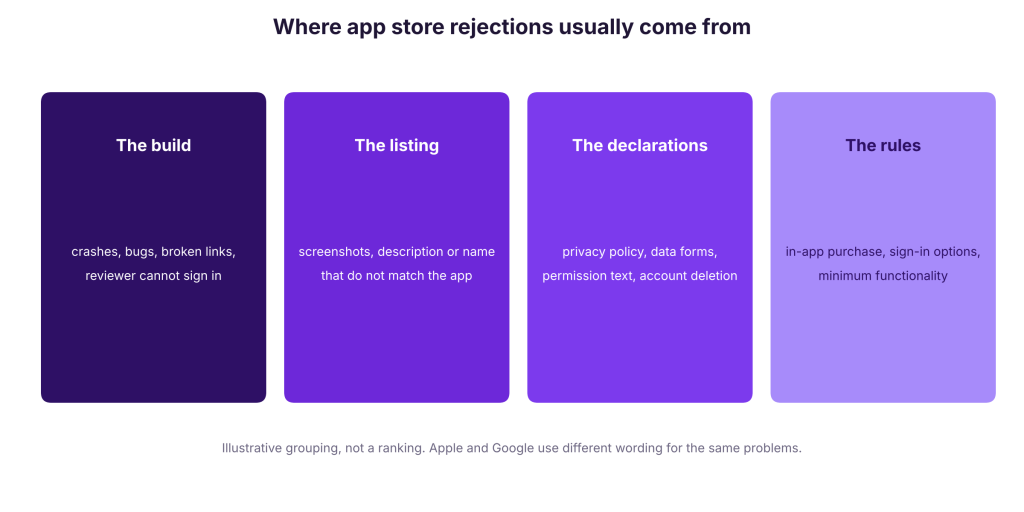
Figure 1: the four places most rejections come from.
The sections below take each cause in turn, with the Apple and Google Play position side by side. This article is the diagnostic guide: it explains why apps are rejected and what to do next. For the end-to-end process of getting an app live, see our app launch guide. Both stores change their rules often, so check the linked pages on the day you submit. This article was in November 2026.
Do crashes and bugs cause rejections?
Yes, and this is the cause most within your control. Apple’s App Review Guidelines require apps to be complete when submitted: no crashes, no obvious bugs, no placeholder text, and no links or features that do not work. Reviewers test on real devices, often with a clean install and a poor connection, so a bug that never appeared on your own phone can still stop approval.
Google Play’s Developer Program Policy sets quality expectations in a similar way, and Google’s automated and manual checks can reject or remove apps that fail to work as described. The fix is the same on both: test the exact release build, not a debug build, on several devices and operating system versions, and fix the flows a reviewer will try first, which are launch, sign-up, sign-in, the main action and any purchase. Our guides to finding bugs in your mobile app and quality assurance in app development cover the testing methods, and a release gate stops a build reaching submission until those flows pass.
What else do reviewers check besides the build?
Beyond stability, reviewers check what you declare about the app, its data and its accounts. The three checks below cause many rejections because they depend on paperwork and settings, not code.
What counts as incomplete information?
Incomplete information is anything the reviewer needs that you have not supplied: missing contact details, a store listing with blank fields, a privacy policy that does not open, an age rating questionnaire left unfinished, or a feature that is described but not yet switched on. Apple lists this under App Completeness and in its metadata rules, and Google Play’s prepare your app for review page covers the App content declarations, including the privacy policy, ads declaration, target audience and content rating.
Two Google Play details catch teams out. The privacy policy must be on a public web page that works without a login or geographic restriction, and Google says unrated apps may be removed. Complete the App content section early rather than on submission day, and have someone who did not build the app click through every field and link.
Why do privacy and permission text cause rejections?
Because both stores check that what you say about data matches what the app does. Apple’s guidelines require a privacy policy and clear consent, and they expect permission request text that explains why the app needs access, such as the camera or location. A vague message like “needed for the app to work” is a common reason for a rejection. Apple’s guideline 5.1.2(i) also asks apps to disclose, and get permission, before sharing personal data with third-party AI, which matters if you have added a language model feature. Our guide to shipping an LLM feature covers the data flow questions.
On Google Play, you must complete the Data safety form and keep it accurate. Google puts the responsibility on you: “You alone are responsible for making complete and accurate declarations”, including what third-party SDKs collect. Google may require a correction or take enforcement action when it finds a mismatch with how the app behaves. List your SDKs, check what each collects, and update the form whenever you add or change one. For iOS, Apple also requires privacy manifests: since 1 May 2024, an app that uses certain listed APIs must declare approved reasons in its privacy manifest to be uploaded to App Store Connect, and the requirement extends to commonly used third-party SDKs, which should be a version that includes its own manifest. Check what your SDKs declare before you build the release. For the UK GDPR side of what you collect and say, see our UK GDPR for apps checklist.
Do both stores require account deletion?
Both expect it where users can create an account in the app. Apple requires apps that support account creation to let users start deletion from within the app; deactivation or disabling alone is not enough. Apple allows a link to a web page for the final steps where needed, and apps using Sign in with Apple should revoke those tokens on deletion.
Google Play’s policy asks for two things: an in-app path to delete the account and associated data, and a web link where users can request deletion without opening the app. You also declare this in the Data safety form. Build the deletion flow, test it end to end with a real account, and make sure it also removes or schedules removal of the data you describe in your privacy policy. Where you must keep some records, such as for legal reasons, say so plainly.
A related Apple rule applies if you offer third-party login. Guideline 4.8 says apps that use a third-party or social login service to set up or authenticate the user’s primary account must also offer an equivalent login service that limits data collection to name and email address, lets users keep their email address private, and does not collect interactions for advertising without consent. It lists exceptions, including apps that use only their own account system and enterprise or education apps that require an existing organisational account. Sign in with Apple is the usual way to meet it. We did not find an equivalent rule on the Google Play pages we read.
Which payment and in-app purchase rules cause rejections?
The usual problem is selling digital goods or unlocking features without using the store’s payment system. Apple’s guideline 3.1.1 requires in-app purchase for unlocking features or content inside the app, and 3.1.2 sets rules for subscriptions, including clear terms before the user pays. Physical goods and services consumed outside the app generally use other payment methods, so the line depends on what you sell. Rules and exemptions differ by region and have changed, so read the current text for the countries you sell in.
Google Play has its own payments policy within the Developer Program Policy. Whichever store, show the price, billing period and renewal terms before the user commits, provide a restore option and avoid pointing users to outside payment pages unless the current policy allows it for your region and app type. If your model is unusual, ask the store’s support before you build around it.
How does misleading metadata lead to a rejection?
Metadata is your name, description, keywords, screenshots and preview. Apple’s guidelines, under 2.3, require it to be accurate and to reflect the app, so screenshots must show the app in use, not only marketing artwork, and descriptions must not promise features that are missing. Apple also expects an app to offer enough lasting value; guideline 4.2 says your app should include features, content and UI that elevate it beyond a repackaged website. It also says apps created from a commercialised template or app-generation service will be rejected unless the provider of the app’s content submits them. If you are deciding between an app and a mobile site, see our app versus website article.
Google Play enforces similar rules against misleading or deceptive listings and may reject or remove apps for them. Write the listing from the finished app, not the roadmap, and remove claims such as “number one” or “best” unless you can support them. Make sure your screenshots match the current version, and avoid mentioning other platforms or competitors in ways the policies prohibit.
What should you give reviewers to test your app?
Give them everything they need to get past the front door. Apple’s guideline 2.1 asks you to provide a working demo account and to keep your backend live during review, with any special hardware, codes or one-time passwords explained in the review notes. Google’s app access section asks for all required details for restricted parts of the app, and you can add several sets of instructions, including notes for multi-factor sign-in.
Use a dedicated test account with realistic data and no expiry, turn off anything that would block it, such as device checks or region limits, and state clearly where any paid feature is. A reviewer who cannot sign in cannot approve your app, and this is one of the cheapest rejections to prevent. Google also has a new-account rule: personal developer accounts created after 13 November 2023 must run a closed test with at least 12 testers opted in for 14 continuous days before applying for production. The page states the rule for personal accounts and does not mention organisation accounts, so check in Play Console which requirement applies to your account type.
Do SDK and API level requirements affect approval?
Yes. On Google Play, new apps and app updates must target Android 16 (API level 36) or higher from 31 August 2026, according to Google’s page when we checked on 23 November 2026. An extension to 1 November 2026 was available, so that date has now passed. Apps that target a lower level are not available to new users on newer Android versions than the app targets, and a submission that misses the requirement can be blocked. Check the page on the day you submit, because the figures move each year, and plan the upgrade as part of normal maintenance, not as a last-minute change.
Apple has a similar rule. Apple’s upcoming requirements page says that, since 28 April 2026, apps uploaded to App Store Connect must be built with Xcode 26 or later using the iOS 26, iPadOS 26, tvOS 26, visionOS 26 or watchOS 26 SDK. We read the requirements page on 24 November 2026; check it on the day you submit, because Apple updates the figures each year.
What do the CMA’s app review commitments mean for UK developers?
The UK competition regulator has taken an interest in how app review works. The Competition and Markets Authority (CMA) designated Apple and Google with strategic market status in mobile platforms in October 2025, and its case page for Apple records the final decision of 22 October 2025. In response, both companies made commitments to the CMA, which the CMA published as final commitments on 1 April 2026. The CMA describes them as given voluntarily, so they are commitments, not binding rules.
The CMA’s February 2026 announcement says the companies must review apps in a fair, objective and transparent way and must not discriminate against apps that compete with their own. It also describes reporting on the proportion of apps submitted, approved, rejected and appealed, the time taken for review, and complaints and their outcomes, with the CMA monitoring and reporting publicly. The CMA’s response to stakeholder views adds detail on timing: it describes Apple as committing to review 90% of submissions within 24 hours, and it says neither company sets a target timeline for internal appeals. The same document does not address explanations for rejections, so do not assume a right to a detailed reason.
What this means in practice is limited. The commitments do not guarantee approval or a particular turnaround for your app, and the CMA says it would expect to move to formal conduct requirements if they prove ineffective. They do give UK developers a stronger basis to raise concerns about unfair or inconsistent review. Keep a record of submission dates, review messages and responses, and use the stores’ complaint routes alongside any appeal. The CMA’s wording and figures may change, so check its pages on the day you rely on them.
What should you check before you submit?
A short, repeatable checklist removes most avoidable rejections. The table below groups the checks by area and points to the rule on each platform. Run it against the release build, assign each check to a named person, and keep the results with the build.
| Area | What to check | Apple | Google Play |
| Stability | Release build tested on several devices and OS versions; no crashes or placeholders | Guideline 2.1 | Developer Program Policy |
| Reviewer access | Working test account, live backend, notes for codes and one-time passwords | Guideline 2.1 | App access instructions |
| Privacy manifests | Privacy manifest and approved reasons for listed APIs; SDK versions that include manifests | Privacy manifest requirements | Data safety form |
| Privacy | Public privacy policy; permission text that explains why; SDKs listed | Guideline 5.1 | Data safety form |
| Account deletion | In-app deletion path; web link where required; tested end to end | Guideline 5.1.1(v) | Account deletion policy |
| Sign-in options | Equivalent login option if you use third-party login | Guideline 4.8 | No equivalent rule found on the pages we read |
| Payments | Digital goods sold through the store; clear subscription terms; restore option | Guidelines 3.1.1 and 3.1.2 | Payments policy |
| Listing | Screenshots and description match the app; no false claims | Guideline 2.3 | Store listing policies |
| Declarations | Age rating, ads, target audience and content rating completed | App Store Connect fields | App content page |
| Platform | Current target API level; closed test completed if the account requires it | Xcode 26 or later with the iOS 26 SDK or newer (since 28 April 2026) | Target API level, testing requirement |
Treat this as a minimum, not a full list. It is a practical summary of the sources linked above, not legal or policy advice, and the stores can change their requirements at any time.
What should you do after a rejection, and how do you appeal?
Start by reading the reason exactly as written. Apple’s message names the guideline, and Google’s policy status page names the policy, so you know what to fix. Reproduce the problem on the release build and on a clean device, then fix everything the message lists and anything similar, because a second round for a related issue costs time. Reply in the review notes with what changed and where to find it, and attach screenshots if it helps. Apple’s guidelines also say that if an app is repeatedly rejected for the same guideline violation, or you have attempted to manipulate the review process, review of your app will take longer. Fix the cause fully before resubmitting.
If you think the decision is wrong, appeal with specifics. Apple lets you appeal to the App Review Board and asks for specific reasons, one appeal per submission that did not pass review, and responses to any requests for more information before appealing. On Google Play, the policy violations page says Google sends instructions on how to appeal if you believe it acted in error, and that an enforcement action stays in effect unless the appeal is granted. Before appealing, make sure the app no longer breaks the policy named in the notice. The figure shows the sequence. Build spare days for at least one rejection into the launch plan, and do not announce a firm public date until you have approval.
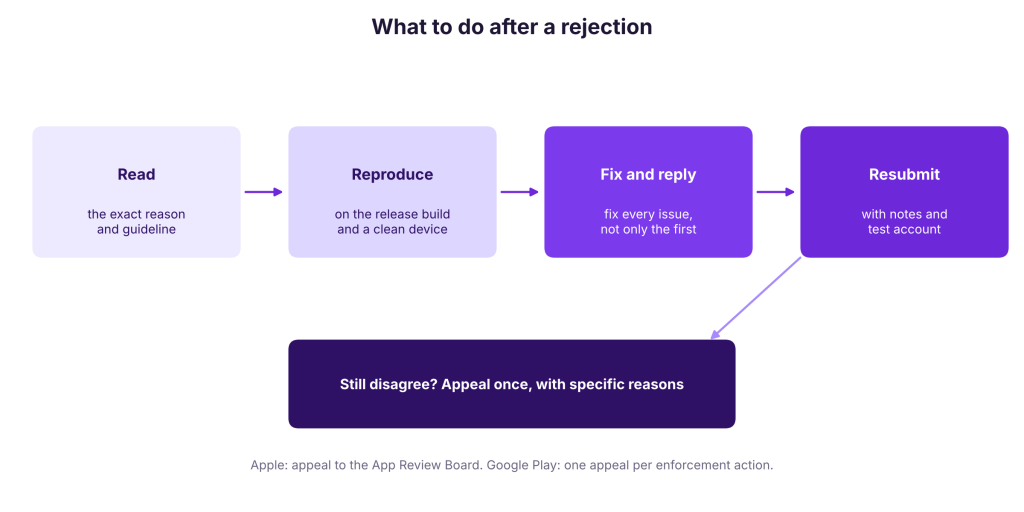
Figure 2: what to do after a rejection.
Frequently asked questions
What is the most common reason for app rejection?
How long does App Store review take?
Why was my app rejected by Google Play?
Do I need account deletion in my app?
Do I have to use in-app purchase?
Can I appeal a rejection?
How can I improve my chances of approval first time?
Do the CMA's commitments change app review in the UK?
Conclusion
Rejections are rarely about one big flaw. They come from small gaps between what the app does, what the listing says and what the store requires. Test the release build, give reviewers access, keep your declarations accurate and leave time for one resubmission, and you will usually be approved without drama.
If you are planning a launch and want the store requirements built into the project from the start, our app development brief template is a good place to begin. To talk it through with the Nordstone team, get in touch.