November 25th, 2026 at 01:48 pm
By Ronak Shah, Nordstone
Last updated: November 2026
UK law names no technical standard for private apps, but the Equality Act 2010 requires service providers to make reasonable adjustments for disabled people, and WCAG 2.2 AA is the usual benchmark. Public sector apps must also meet the 2018 regulations and publish an accessibility statement. Build for text scaling, contrast, touch targets and screen readers from the start.
TL;DR
- The Act covers providers generally: section 29 of the Equality Act 2010 applies to anyone providing a service to the public or a section of it, for payment or not, and a duty to make reasonable adjustments applies.
- The duty is anticipatory: paragraph 7.20 of the Code says the duty to make reasonable adjustments is owed to disabled people generally, so apps should be accessible before anyone complains.
- Public sector apps have a named standard: UK says public sector websites and mobile apps must meet WCAG 2.2 AA and publish an accessibility statement.
- WCAG 2.2 adds nine criteria: W3C lists four at level AA, including Target Size (Minimum) at 24 by 24 CSS pixels and Dragging Movements.
- The EU rule can reach UK sellers: the European Accessibility Act applies from 28 June 2025 to services such as e-commerce and consumer banking, with an exemption for microenterprises providing services.
- Test with the real tools: Apple points to Accessibility Inspector and VoiceOver, and Android guidance points to Accessibility Scanner and TalkBack.
What does UK law expect of mobile apps?
The Equality Act 2010 does not mention apps or WCAG. It sets a duty that apps fall under when they are part of a service. Section 29 says a person concerned with providing a service to the public or a section of the public, for payment or not, must not discriminate, and it applies a duty to make reasonable adjustments to service providers. Section 20 describes that duty as three requirements: take reasonable steps where a provision, criterion or practice puts a disabled person at a substantial disadvantage, where a physical feature does, and to provide an auxiliary aid where one is needed. Where the requirement relates to information, the steps include providing it in an accessible format.
In practice, that means an app that a blind, low-vision, deaf or motor-impaired person cannot use may leave you open to a claim that you failed to make reasonable adjustments. Whether a given step is reasonable depends on the circumstances, and only a court can decide a case. Because the Act names no standard, teams and buyers usually use WCAG as the yardstick, as the figure shows. A new statutory Code of Practice for services, public functions and associations was published by the Equality and Human Rights Commission and the Office for Equality and Opportunity, and GOV.UK says it came into force on 5 August 2026. Read its sections on reasonable adjustments with your legal adviser. This article is general information, not legal advice, and the Act applies in Great Britain; Northern Ireland has separate disability legislation.
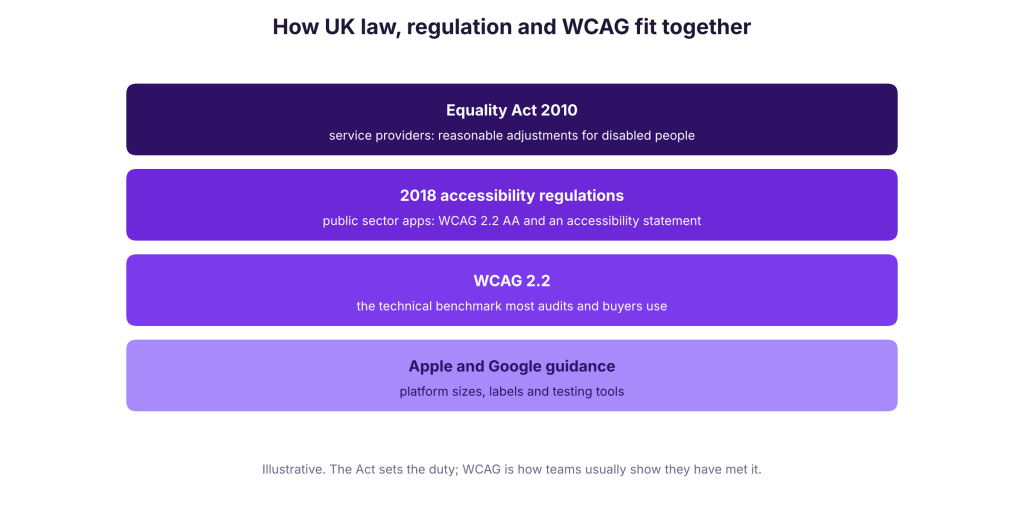
Figure 1: how the law, the regulations and WCAG fit together.
Which organisations does the Equality Act cover?
Any organisation that provides a service to the public or a section of the public, which includes a retailer, a bank, a charity offering a service, a healthcare provider or a business with a customer app. The wording in section 29 covers services provided free of charge, so a free app is not outside the duty by being free. Employers have separate duties to staff and job applicants under other parts of the Act, which this article does not cover.
If your app serves the public, treat accessibility as part of the service you provide, not a late polish. If your app is an internal tool or enterprise product sold to other businesses, your customers may still require accessibility in their contracts, because their own staff and customers may use it. Ask early who the end users are and what your client’s policy requires.
What is the anticipatory duty, and why does it matter for app teams?
The duty to make reasonable adjustments is not triggered by a complaint. The Code of Practice for services says in Chapter 7, “Disabled people: reasonable adjustments”, that the duty is owed to disabled people generally (paragraph 7.20) and is anticipatory (paragraphs 7.22 and 7.23). Providers should not wait until a disabled person wants to use the service before thinking about adjustments, and paragraph 7.25 says the duty applies whether or not the provider knows a particular person is disabled. The wording of section 20 itself refers to “a disabled person”; the Code is where the generality and the anticipatory approach are set out.
For an app team, that means accessibility work belongs in design and build, before launch, and not only in reply to a user’s complaint. Paragraph 7.15 says that once the duty arises, a provider “cannot justify a failure to make a reasonable adjustment”, although the Act limits what counts as reasonable. Chapter 3 of the same Code says the obligation applies to services provided on a website (paragraph 3.6), and paragraph 7.63 lists screen readers among the examples of auxiliary aids. We did not find the Code applying these points to mobile apps by name, so treat the app point as a reasonable reading, and ask your legal adviser. Paragraph numbers are from the version on GOV.UK that we read on 25 November 2026; the page address includes the word “draft”, so check the numbering against the final text.
Do the 2018 public sector regulations apply to your app?
They apply if you build for, or are, a public sector body. GOV.UK guidance says the rules cover public sector bodies, including central and local government and some charities and other non-government organisations, and that mobile apps developed for public use are covered. It also says websites and mobile apps must meet the WCAG 2.2 AA standard, subject to legal exceptions, and that the organisation must publish an accessibility statement explaining how accessible the app is and review it regularly. The underlying law is The Public Sector Bodies (Websites and Mobile Applications) (No. 2) Accessibility Regulations 2018.
Scope has exceptions. GOV.UK lists some bodies as fully exempt, such as certain non-government organisations, and others, such as schools and nurseries, as partly exempt. It also covers disproportionate burden, which can be claimed only after a legally required assessment and must be declared in the statement. In England, Scotland and Wales, the Equality and Human Rights Commission enforces the requirements, and in Northern Ireland the Equality Commission for Northern Ireland does. If you are unsure whether a client is in scope, ask the client’s digital team, and check the current guidance before you rely on it. GOV.UK shows 30 September 2024 as the last update date on the page we read.
What does WCAG 2.2 add for mobile apps?
WCAG 2.2 became a W3C Recommendation on 5 October 2023, and W3C’s summary of what is new lists nine new success criteria. Four are at level AA, the level most contracts and regulations target: 2.4.11 Focus Not Obscured (Minimum), 2.5.7 Dragging Movements, 2.5.8 Target Size (Minimum) and 3.3.8 Accessible Authentication (Minimum). The other five are 2.4.12, 2.4.13 and 3.3.9 at AAA, and 3.2.6 Consistent Help and 3.3.7 Redundant Entry at level A. The old criterion 4.1.1 Parsing was removed as obsolete.
The four AA criteria are the ones to plan for in apps. Target size sets a minimum of 24 by 24 CSS pixels, with exceptions. Dragging movements means anything done by dragging, such as reordering a list or a slider, needs a simple single-pointer alternative. Focus not obscured means a sticky header, keyboard or cookie banner must not completely hide the item that has focus. Accessible authentication means a login should not depend on a cognitive test such as remembering a password with no way to paste it or use a password manager. WCAG is written for web content, so for a native app you need guidance on how each WCAG 2.2 criterion applies. W3C’s WCAG2ICT, a W3C Group Note published on 21 August 2025, covers applying WCAG 2.0, 2.1 and 2.2 to non-web documents and software, and W3C’s overview page says that includes mobile apps and native applications. It is informative guidance, not a requirement. The European standard EN 301 549 also has clauses for software, and ETSI says it can be applied to web pages, mobile applications and desktop applications. Agree with your auditor which of these they will test against before testing starts.
Does the European Accessibility Act affect UK businesses?
It can, if you sell to consumers in the EU. The European Accessibility Act is Directive (EU) 2019/882, and it applies from 28 June 2025. It is EU law, so it does not apply in the UK as such, but its scope covers services provided to consumers, including consumer banking services, e-books and dedicated software, and e-commerce services (Article 2(2)). A service provider is defined in Article 3(4) as someone who makes offers to provide such a service to consumers in the Union. The text we read does not say how that reaches a business established outside the EU, and each member state applies the Directive through its own national law, so take advice from an EU lawyer before concluding that you are in or out of scope. We read the adopted text as hosted on legislation.gov.uk because EUR-Lex was not reachable from our environment; check it for later amendments.
There is an exemption: under Article 4(5), microenterprises providing services are exempt from the service accessibility requirements. Article 3(23) defines a microenterprise as an enterprise with fewer than ten staff and either turnover or a balance sheet total of no more than EUR 2 million. It applies to services, not to products, so check which category your app falls into.
The standard behind it is EN 301 549. Under Article 15, products and services that meet harmonised standards cited in the Official Journal are presumed to conform. The Irish National Disability Authority reports that EN 301 549 V4.1.1 was published on 2 September 2026, moving its web content baseline from WCAG 2.1 to WCAG 2.2 Level AA, and that its citation in the Official Journal is expected on 16 December 2026. Until that citation, V3.2.1 from 2021 remains the version in force, so confirm the position on the day you rely on it.
What should a mobile accessibility checklist include?
Six checks cover most of what goes wrong, and they apply to every screen. The table compares what WCAG, Apple and Android say for each, using each platform’s own accessibility pages.
| Area | WCAG 2.2 | Apple guidance | Android guidance |
| Text size | Text resizable to 200% (1.4.4, AA) | Allow enlargement by at least 200%; Dynamic Type | Specify font sizes in scalable pixels (sp) so users can change text size; body text no smaller than 12 sp |
| Contrast | 4.5:1 for normal text, 3:1 for large text (1.4.3, AA) | 4.5:1 up to 17 pt; 3:1 at 18 pt or bold | 4.5:1 under 18sp (bold under 14sp); 3:1 otherwise |
| Touch targets | 24 by 24 CSS px minimum (2.5.8, AA), with exceptions | 44 by 44 pt default on iOS; 28 by 28 pt minimum | At least 48 by 48 dp |
| Screen readers | Name, role and value for controls (4.1.2, A) | Describe the interface and content for VoiceOver | Add a contentDescription for each element’s purpose |
| Gestures | Single-pointer alternative to dragging (2.5.7, AA) | Offer alternatives to gestures | Do not rely on gestures for every action; provide accessibility actions or a button alternative |
| Captions | Captions for prerecorded audio in video (1.2.2, A) | Captions, subtitles, audio descriptions, transcripts | Support the system caption preferences in media apps; Google’s help page warns they may not work in apps that do not support them |
For text, support the system text size setting so that text scales and layouts do not break or clip. Apple suggests allowing text to be enlarged by at least 200 per cent, either through Dynamic Type or custom controls. For contrast, check the actual colours in both light and dark modes, and do not use colour alone to show errors or status. For touch targets, size controls to the platform guidance and leave room between them, since Apple suggests about 12 points of padding around bezelled elements.
For screen readers, give every control a meaningful name, role and state, and mark decorative images so they are skipped. Android’s guidance says to describe the purpose of an element, not its look, and to avoid redundant words such as saying ‘button’ after a button’s label. For focus order, make the reading order match the visual order, return focus sensibly after dialogs close, and do not trap it. In Jetpack Compose, the default is left to right, then top to bottom, and isTraversalGroup and traversalIndex let you adjust it where that does not work. For captions, provide captions for video, and transcripts or audio descriptions where the content needs them, following Apple’s guidance on captions, subtitles, audio descriptions and transcripts. Also offer a button alternative to gestures such as swipe to delete.
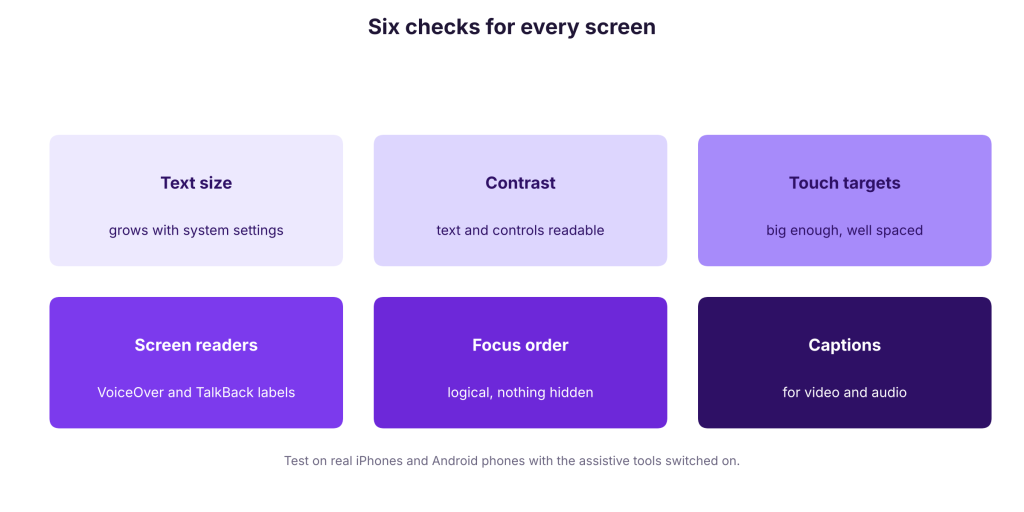
Figure 2: six checks to run on every screen.
How do you test app accessibility on iOS and Android?
Test in three layers. First, run the automated checkers: Apple’s Accessibility Inspector and Android’s Accessibility Scanner flag issues such as missing labels, small targets and low contrast. They find only part of the problems, so they are a first pass, not a sign-off. Second, test by hand with the assistive tools turned on: VoiceOver on iPhone and TalkBack on Android. Move through each key journey, such as sign-up, sign-in, search, checkout and settings, using the screen reader alone, with the screen off if you can, and note anything that is unlabelled, announced in the wrong order or impossible to activate.
Third, test the settings people change: the largest text size, bold text, reduced motion, increased contrast, dark mode, landscape orientation and an external keyboard or switch control where your audience may use them. Where you can, include disabled users in testing, because they will find problems the team misses. Add accessibility to your release gate so that a build with a blocking issue cannot ship. Our September QA checklist has an accessibility testing section with the step-by-step pre-launch checks, while this article explains what the law and standards expect and why. Related reading: our guides to finding bugs in your mobile app and quality assurance in app development.
How do you build accessibility into the project and the contract?
Put it in the brief, not the final week. State the standard you are targeting, such as WCAG 2.2 AA, and the platforms and assistive technologies you will test with. Ask for accessibility to be part of design reviews, so that colour palettes, type scales and component sizes are checked before they are built, which is much cheaper than fixing a finished app. Agree who will carry out an independent audit before launch and how defects will be prioritised.
If you are a public sector body, or sell to one, plan for the accessibility statement as a deliverable. If you sell to EU consumers, record whether the European Accessibility Act applies and which version of EN 301 549 you are testing against. Apple’s Accessibility Nutrition Labels are voluntary to start: Apple’s page said on 25 November 2026 that providing them is voluntary at first, but that over time developers will be required to share accessibility support details to submit new apps and app updates, with ample notice. We saw no date for that on the page. You are responsible for accurate answers, and Apple says you should indicate support for a feature only if users can complete all the common tasks of your app using it, so claim only what you have tested. Put the standard, the audit and the defect-fix terms in the statement of work or master services agreement, as our SOW and MSA guide explains, and record the requirements in our app development brief template before you ask suppliers to quote.
Frequently asked questions
Does the Equality Act apply to mobile apps?
Is WCAG 2.2 a legal requirement for UK apps?
Which UK organisations must publish an accessibility statement?
What is new in WCAG 2.2?
How big should touch targets be?
How do I test an app with VoiceOver and TalkBack?
Do automated accessibility tools find every problem?
Does the European Accessibility Act apply to UK businesses?
Conclusion
Accessibility is easiest and cheapest when it is part of design and testing from the start. Know which rules apply to you, choose WCAG 2.2 AA as the target, use the platform’s own accessibility features and tools, and test with VoiceOver and TalkBack before every release.
If you are planning an app and want accessibility written into the scope, our app development brief template is a good place to start.
To talk it through with the Nordstone team, get in touch.