September 10th, 2026 at 08:02 am
Last updated: September 2026 Author: Ronak shah, Nordstone — app development consultancy.
Before you write a line of code or brief an agency, five free tool categories cover most of what a founder needs: validation (surveys, landing pages), wireframing (Figma), project management (Trello, Notion, ClickUp), no-code prototyping (Adalo, Glide), and analytics (GA4, PostHog, Hotjar). Each has a genuinely usable free tier — the trick is knowing where each one stops.
TL;DR
- Tool categories you need: idea validation, wireframing/prototyping, project management, design assets, no-code prototyping, analytics and feedback.
- Top free picks: Google Forms/Typeform for surveys, Figma’s Starter plan for design, ClickUp or Trello for PM, Adalo/Glide for clickable no-code prototypes, GA4 and PostHog for analytics.
- Where free stops being enough: Figma’s free tier caps you at 3 team files; Google Play’s closed-testing rule and Apple’s $99/year fee aren’t optional; no-code free tiers rarely allow real app-store publishing.
- Free doesn’t mean permanent: most free tiers are “build and test,” not “launch and scale” — budget for at least one paid tool once you have real users.
- Data portability matters: check export options before you commit hours to any free tool, since not all free tiers let you take your work with you.
What free tools do you actually need to plan an app?
Before a single screen gets designed, most successful app founders work through five categories in roughly this order: validating that the idea solves a real problem, wireframing what the solution looks like, organising the work of building it, gathering design assets, and — once something exists — measuring how real users behave. You don’t need a paid tool in any of these categories to get from “idea” to “testable prototype,” and in most cases you don’t need one to get to “live MVP” either. Our breakdown of mobile app development cost in the UK shows what a validated idea typically costs; free tiers genuinely fall short at scale: team collaboration limits, file caps, and app-store publishing requirements are the walls you’ll eventually hit, not core functionality.
Idea and validation tools
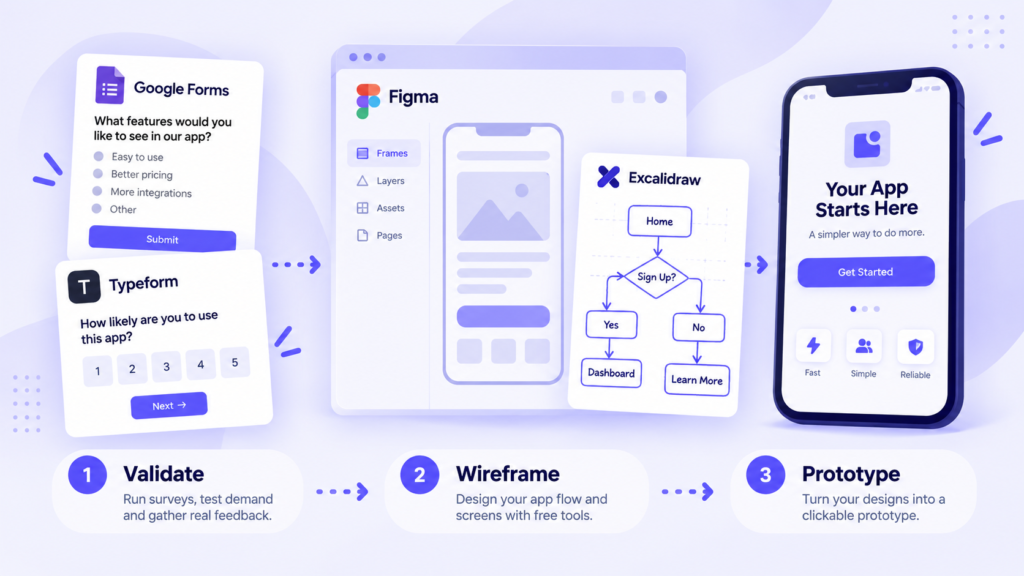
Before building anything, validate that people actually want it. Google Forms remains the fastest free way to run a structured survey with no design skill required, and Typeform‘s free tier handles a small number of more polished, conversational-style forms if presentation matters for your audience. For competitor research, manually reviewing App Store and Google Play listings, reading recent reviews, and checking a competitor’s public pricing page will get you further than most paid competitive-intelligence tools at this stage. To test real demand before building, a simple landing page — built free on Carrd or a free-tier Notion page — with an email capture form and a genuine call to action (“join the waitlist”) gives you a real signal: did people actually leave their email, or did they just say “sounds nice” in conversation?
Wireframing and prototyping
Figma‘s free Starter plan is genuinely usable for early-stage design work: unlimited personal draft files, full access to the design editor, and real-time collaboration for viewers, with the main constraints being three team files, three Fig Jam boards, a two-editor cap per file, and 30 days of version history. For a solo founder or a two-person team working on one app at a time, that’s rarely a binding constraint — it becomes one once you’re running multiple concurrent client or team projects and hit the three-file ceiling. If you want a lighter alternative for rough sketching before committing to Figma, Excalidraw’s free tier is a good fit for quick wireframes and flow diagrams that don’t need pixel-perfect polish.
Project management
For a small founding team, Trello‘s free plan covers up to ten boards with unlimited cards, which is genuinely enough for most solo founders or two-to-three-person teams running a single product roadmap — its constraints (one Power-Up per board, 10MB attachment limit) mainly bite once you need deeper automation. ClickUp‘s free plan is the most feature-rich of the mainstream options: unlimited members and tasks, multiple views (list, board, calendar), and native time tracking at no cost, though storage is capped at 100MB and advanced automation is gated behind paid tiers. Notion‘s free personal plan is the best fit if you want your task tracker living alongside product specs, meeting notes and a lightweight knowledge base in one place, though real-time team collaboration and admin controls require a paid Team plan once you’re working with others.
| Tool | Best free-tier strength | Where it hits a wall |
| Trello | Unlimited cards across 10 boards; fastest to learn | One Power-Up per board; 10MB attachment cap |
| ClickUp | Most generous free tier for teams — unlimited members and tasks | 100MB total storage; automation capped |
| Notion | Unlimited pages/databases for individuals; docs + tasks in one place | No real-time team collaboration on the free plan |
Design and assets
You don’t need a paid stock or icon subscription to get a professional-looking early build. Unsplash and Pexels offer genuinely free, high-resolution photography with commercial usage rights, while Flaticon and Font Awesome‘s free tiers cover most common UI icon needs. For colour palettes, Coolors generates and locks in accessible palettes for free, and Google Fonts remains the simplest way to license typography for both your app and any marketing pages without cost or attribution headaches.
No-code prototype builders
If you want a clickable, testable version of your app before committing to custom development, several no-code builders offer free tiers worth using — but it’s important to know what “free” means on each. Adalo’s free plan is one of the most functional for genuine prototyping: around 500 database records and full builder access, output as a progressive web app, though publishing natively to the App Store and Google Play requires a paid plan. Glide takes a similar approach, turning a Google Sheet or Airtable base into a usable web app for free within a similar record limit — ideal for quickly testing a data-driven concept like a directory or booking tool. Bubble’s free tier is best understood as a development sandbox: you can build and preview a full web app, but the free plan doesn’t allow publishing to a live custom domain. None of the mainstream no-code free tiers currently allow native App Store or Google Play publishing without upgrading. Once you’re ready to actually publish, our guide to launching an app on the App Store and Google Play walks through accounts, assets and the review process. Treat these tools as prototyping and validation tools rather than a free route to a shipped app.
Analytics and feedback
Once something is live — even a prototype shared with a handful of testers — you want to know how people actually use it, not just what they tell you. Google Analytics 4 remains free with no user cap, handling up to roughly 10 million events per property per month with 14 months of data retention, though it comes with well-documented data-sampling and privacy trade-offs at higher volumes. PostHog‘s free tier is unusually generous for a product-analytics tool: around 1 million events and 5,000 session replays a month with full feature access, covering event tracking, session replay and feature flags in a single platform — a strong fit if you want deeper product analytics than GA4 offers without paying for it. For lightweight heat maps and session recordings specifically, Microsoft Clarity is free with no session cap, and remains a solid pairing with GA4 if you want visual behavioural data without moving to a full product-analytics platform.
When free stops being enough
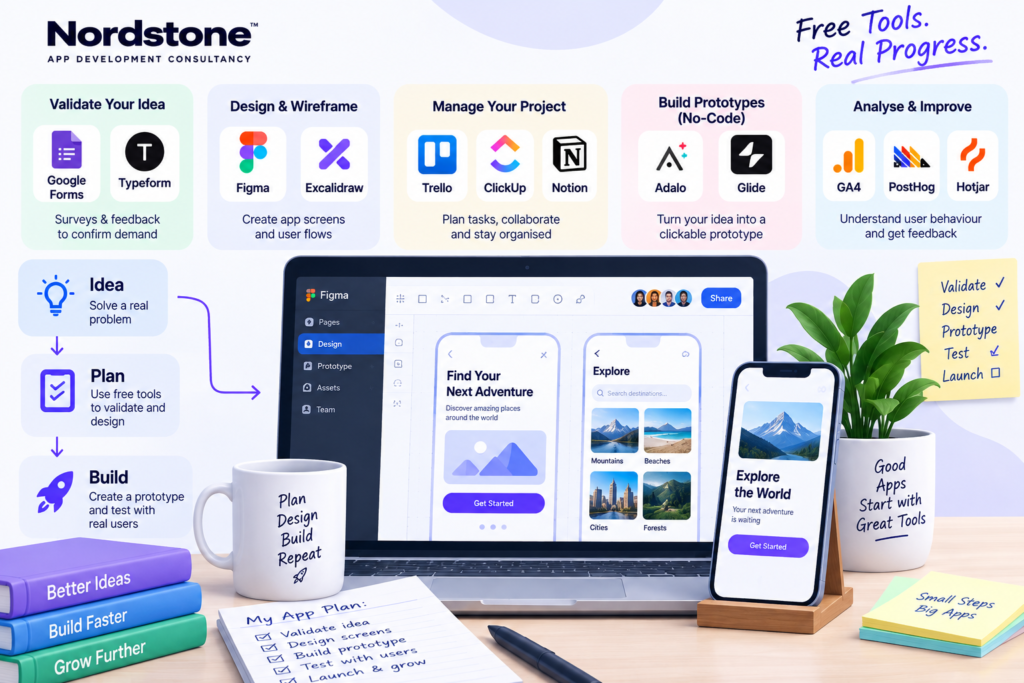
Free tiers are built to get you to a validated idea and a working prototype — they’re not designed to run a live product with real customers indefinitely, and pretending otherwise usually costs more time than it saves. The clearest signals it’s time to pay: you’re regularly hitting file, record or storage caps and working around them rather than working through them; you need real team collaboration (shared editing, admin permissions) rather than solo access; or you’re ready to actually publish to the App Store or Google Play, at which point Apple’s $99/year developer fee and Google Play’s one-time $25 fee become non-negotiable regardless of which tools you used to get there. As a rule of thumb, it’s worth budgeting for your first paid tool — usually a project management or design seat — once you bring on a second full-time collaborator, rather than waiting until the free-tier limits force the decision for you.
Frequently asked questions
What free tools do I need to plan an app?
Is Figma free good enough for app design?
Can I build an app for free?
What's the best free project management tool for a startup?
Are no-code tools good enough for a real product?
What free analytics should I use?
When should I stop using free tools?
Do free tools own my data or work?
Download the app brief template
Turning validated ideas into a clear, buildable brief is often the hardest step between “I’ve tested the idea” and “I’m ready to build.” If you’d like a structured app brief template — or a second opinion on what you’ve put together with these free tools — get in touch with Nordstone.